API
API
API Settings page allows administrators to enable and configure the Ezeelogin API functionality. The API can be used to automate user management, server management, access control operations, and password reset tasks from external applications such as billing systems, provisioning systems, or custom automation scripts
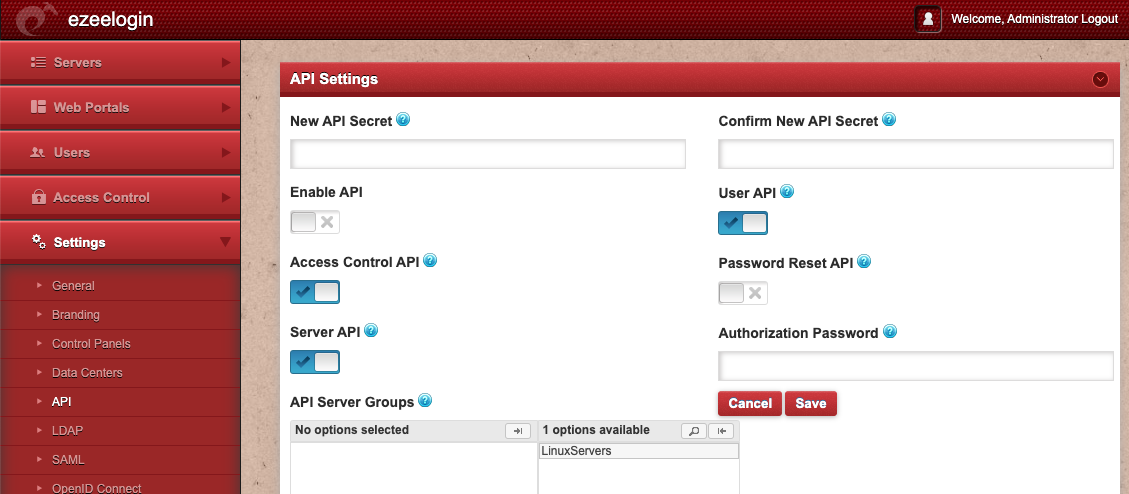
An API script /usr/local/ezlogin/ezapi.php and another one /usr/local/ezlogin/ezwapi.php (which uses the new web based API) are provided for server add/edit/delete tasks in Ezeelogin.
- New API Secret Enter new API code to change existing one.
- Confirm new API Secret Confirm the new API code.
- Enable API Check/uncheck this box to enable/disable the use of web based API and/or ezapi.php script.
- User API
Once enabled
php /usr/local/ezlogin/ezwapi.php -help
Usage:
ezwapi.php -help <action>
action : API action (list_servers/add_server/update_server/remove_server/reset_fingerprint/get_password/setup_sshusers/add_user_server_acl/suspend_user/unsuspend_user/force_user_password_change/reset_user_password/reset_user_2fa/set_user_expiry)
NOTE: 'set_user_expiry' will also make the user active if suspended
- UserAccess Control API Enable/ Disable API operation on Users access features.
- Password Reset API Enable/ Disable API operation on Users password.
- Server API Enable/ Disable API operation on servers
- API Server Groups on Enable / Disable the the server group on which the API operations can be performed
- Authorization Password Enter the current password to save the changes.