Logs
Cluster Logs Page
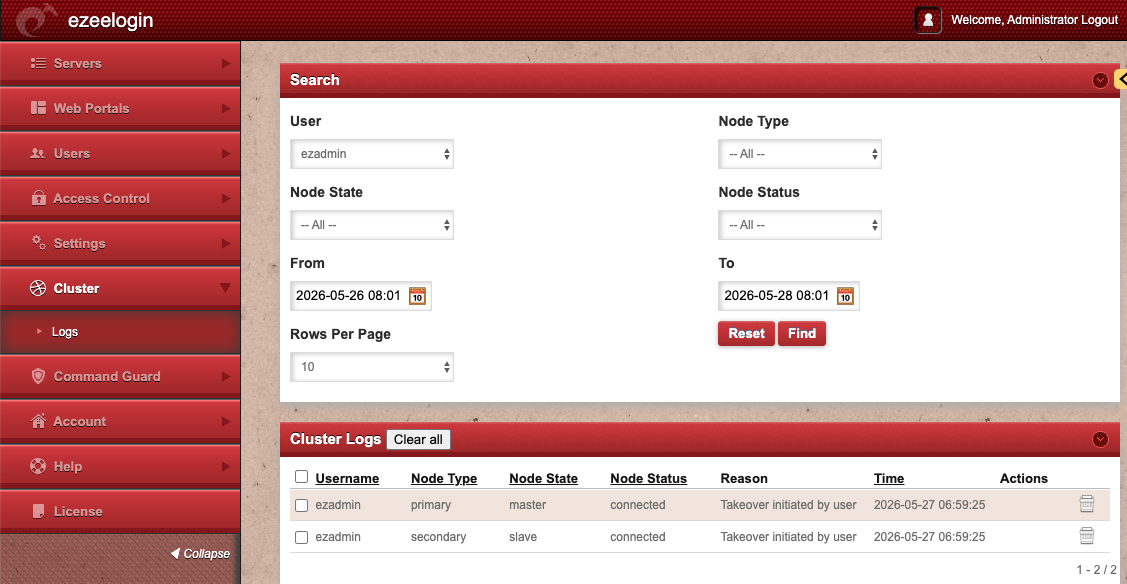
This section provides a centralized view of cluster-related events and synchronization activities between the primary and secondary nodes in a High Availability (HA) cluster setup. This page helps administrators monitor node status changes, takeover operations, synchronization events, and cluster communication issues
Purpose
The Cluster Logs page is used to:
- Monitor HA cluster activities
- Track failover and takeover events
- Verify synchronization between nodes
- Troubleshoot cluster communication issues
- Audit administrator-triggered cluster actions
Administrative Use Cases
Administrators commonly use this page to:
- Confirm successful cluster takeover operations
- Verify secondary node connectivity
- Diagnose replication or synchronization failures
- Audit HA-related administrator actions
- Monitor cluster stability
Search Filters
The upper section of the page contains search and filtering options for narrowing log results.
User
Displays logs generated by a specific Ezeelogin administrator account.
Node Type
Filter logs by cluster node type:
- Primary – Main active cluster node
- Secondary – Standby/failover node
Node State
Displays the operational state of the node.
Typical values include:
- Master
- Slave
Node Status
Shows the current connectivity or synchronization status of the node.
- Connected
- Disconnected
From / To
Specify the date and time range for log retrieval.
Rows Per Page
Controls the number of log entries displayed per page.
Find
Executes the search using the selected filters.
Reset
Clears all filters and reloads the default log view.