

What Is an SSH Gateway? A Complete Guide to Centralized Secure SSH Access
Introduction
As organizations expand their infrastructure across cloud platforms, on-premises data centers, and hybrid environments, securing administrative access becomes increasingly complex. Administrators often require secure access to hundreds or even thousands of Linux servers, network devices, and cloud instances. Traditional methods such as VPNs and direct SSH access expose organizations to unnecessary risks and make access management difficult.
An SSH Gateway provides a secure, centralized entry point for SSH connections, allowing organizations to control, monitor, and audit privileged access without exposing internal infrastructure to the internet.
In this guide, we’ll explain what an SSH Gateway is, how it works, its benefits, best practices, and why Ezeelogin SSH Gateway is an ideal solution for enterprise privileged access management.
What Is an SSH Gateway?
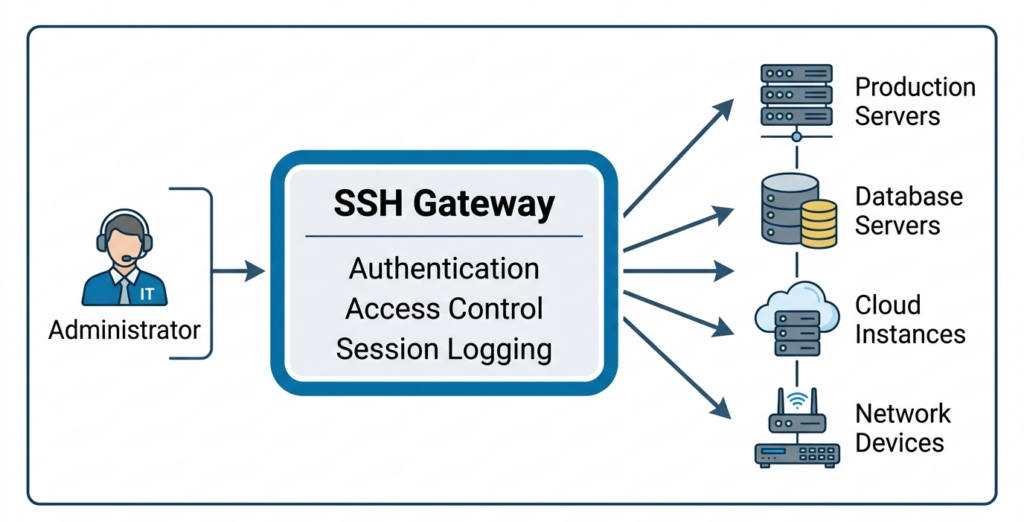
An SSH Gateway (also called an SSH Bastion Host, Jump Server, or SSH Jump Host) is a secure intermediary server that acts as the single point of entry into a protected network.
Instead of allowing administrators to SSH directly into production servers, users first authenticate to the SSH Gateway. The gateway then securely establishes the connection to the target server. This architecture significantly reduces the organization’s attack surface while providing centralized access management.
Why Organizations Need an SSH Gateway
As IT infrastructure grows more complex, organizations face several security challenges:
- Hundreds of SSH keys
- Shared administrator accounts
- Lack of centralized auditing
- Poor visibility into administrator activities
- Difficult user provisioning and deprovisioning
- Compliance requirements (PCI DSS, HIPAA, ISO 27001, SOC 2)
An SSH Gateway solves these problems by introducing centralized authentication, authorization, and auditing.
How an SSH Gateway Works
Step 1: User Authentication
The user logs in to the gateway with their own credentials, typically strengthened with multi-factor authentication.
Authentication may include:
- Password
- SSH Key
- Multi-Factor Authentication (MFA)
- LDAP
- Active Directory
- SAML Single Sign-On
Step 2: Identity Verification
The gateway validates:
- User identity
- Group membership
- Access policy
- Time restrictions
- IP restrictions
Only authorized users are allowed to continue.
Step 3: Connection to Target Server
The SSH Gateway opens a secure connection to the requested server on behalf of the administrator.
Step 4: Session Monitoring
The gateway can monitor:
- Commands executed
- Terminal activity
- Login time
- Logout time
- Session duration
- File transfers
Step 5: Audit Logging
Every SSH session is logged for:
- Compliance
- Security investigations
- Incident response
- User accountability
Key Features of an Enterprise SSH Gateway
When evaluating an SSH gateway solution, prioritize:
- Centralized Access Management
Instead of managing SSH access individually on every server, administrators manage access policies in one location.
Benefits include:
- Simplified administration
- Faster onboarding
- Easier offboarding
- Reduced configuration errors
2. Two-factor authentication on top of standard SSH login, to stop credential-based attacks. Even if credentials are stolen, MFA prevents unauthorized access.
3. Role-Based Access Control (RBAC)– Different users receive different permissions based on their role.
For example:
| Role | Access |
|---|---|
| Linux Admin | Production Linux Servers |
| DBA | Database Servers |
| Network Engineer | Switches and Routers |
| DevOps Engineer | Kubernetes and Cloud Instances |
4. Centralized key and password management
5. Session recording of full terminal activity, searchable and exportable for audits.
6. Detailed logs and reporting for compliance frameworks like SOC 2, PCI-DSS, HIPAA, and ISO 27001.
7. Easy integration with existing centralized access management systems like AD/LDAP, so user accounts and permissions stay in sync with your organization’s existing directory.
8. High availability and clustering ensure the SSH gateway remains operational without becoming a single point of failure.
9. Automatic server discovery, so new infrastructure is imported and brought under the gateway’s control without manual onboarding.
10. Control and manage servers and users via API, so tasks like adding or removing servers, resetting passwords, and suspending users can be automated instead of handled manually in the GUI.
SSH Gateway vs. Direct SSH Access
| Feature | Direct SSH | SSH Gateway |
|---|---|---|
| Centralized Authentication | No | Yes |
| MFA | Rare | Yes |
| Session Recording | No | Yes |
| Audit Logs | Limited | Comprehensive |
| RBAC | Difficult | Built-in |
| SSH Key Management | Manual | Automated |
| Compliance Reporting | Difficult | Easy |
| Attack surface | High | Low |
Common SSH Gateway Use Cases
Hosting and managed service providers use an SSH gateway to give support staff controlled access to thousands of customer servers without ever handing out root credentials directly.
Distributed engineering teams use role-based access so contractors and new hires get exactly the server access their role requires no more, no less from day one.
Organizations managing hybrid or multi-cloud infrastructure use a gateway to maintain one consistent access and audit policy across on-premises servers, cloud instances, and containers alike.
Government agencies managing critical IT infrastructure.
How Ezeelogin Works as an SSH Gateway
Ezeelogin is a self-hosted SSH gateway built specifically to replace direct server access with a single, controlled, and fully audited point of entry. It brings together the core capabilities organizations look for in an SSH gateway.
Because Ezeelogin is self-hosted, the gateway and every credential it manages stays inside your own infrastructure rather than a third-party cloud service.
Frequently Asked Questions
Is an SSH Gateway the same as a VPN?
No. A VPN provides network-level access, whereas an SSH Gateway provides controlled, application-level access to specific systems. An SSH Gateway offers finer-grained access control, session monitoring, and auditing.
Can I use an SSH Gateway without exposing internal servers?
Yes. Only the SSH Gateway needs to be accessible from trusted networks. Internal servers can remain on private networks, significantly reducing the attack surface.
What happens if the SSH gateway itself goes down? This is why clustering and high availability matter. A properly deployed gateway setup should include failover so a single outage doesn’t block access to every managed server.
Conclusion
An SSH Gateway is a foundational component of a secure privileged access strategy. It provides centralized SSH authentication, enforces access controls through MFA and RBAC, reduces the attack surface by eliminating direct server exposure, and delivers the audit trails required for compliance and incident response.