

RADIUS MFA for network devices: how it works and where it breaks
Most teams already have MFA on email, VPN and cloud consoles. The admin login on a core switch is often still a password, sometimes one shared by the whole network team. RADIUS MFA, also called RADIUS 2FA, is the usual way to fix that: switches, routers and firewalls already know how to ask a RADIUS server whether a login is valid, so you put an MFA-capable RADIUS server in that path.
It works, but there are a few traps that catch almost everyone the first time. This guide explains how RADIUS carries a second factor, how to set it up on network gear, where it breaks, and when a different approach is simpler.
How RADIUS MFA works?
RADIUS was designed in the 1990s to check a username and password. It has no MFA built in. What it does have is a simple conversation between the device (the RADIUS client) and the RADIUS server:
- An engineer SSHes to the switch and types a username and password.
- The switch sends an Access-Request to the RADIUS server.
- The server answers with Access-Accept, Access-Reject or Access-Challenge (“I need more information”).
RADIUS MFA products sit in the server role. They check the password against your directory (Active Directory, LDAP) and then ask for the second factor before sending Access-Accept. In practice they are either a RADIUS server with MFA built in, or an MFA proxy that sits in front of an existing RADIUS server such as FreeRADIUS, Microsoft NPS or Cisco ISE.
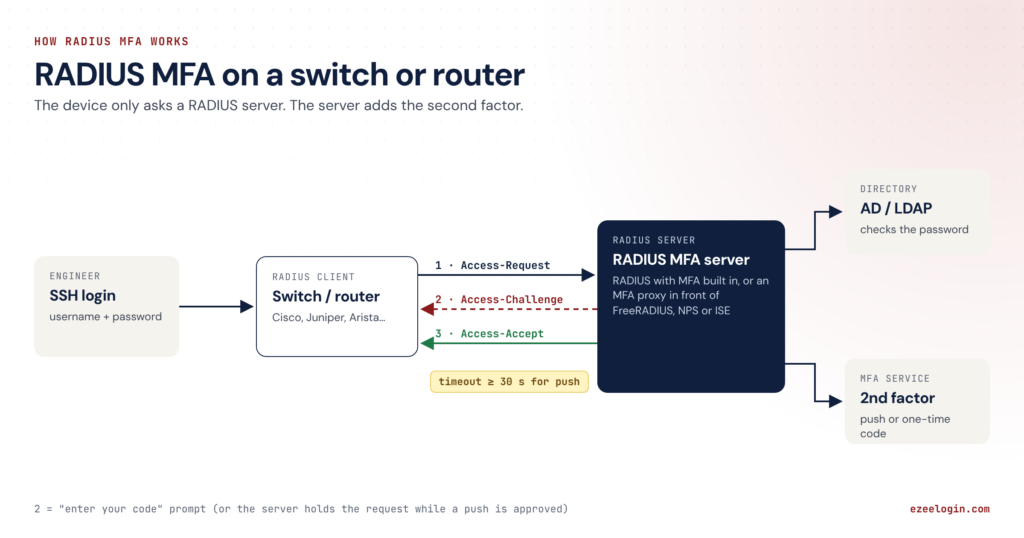
How RADIUS MFA works: the switch sends an Access-Request to a RADIUS MFA server, which checks the password, asks for a second factor and returns Access-Accept.
Alt text: How RADIUS MFA works: the switch sends an Access-Request to a RADIUS MFA server, which checks the password, asks for a second factor and returns Access-Accept.
Three ways the second factor reaches the user
How the second factor is collected depends on what the device and the MFA server support. There are three common patterns:
- Challenge-response. The server replies with Access-Challenge and a message such as “Enter your code”. The device shows that prompt, the engineer types the code, and the device sends a second Access-Request. This feels the most natural, but the device’s login process has to support RADIUS challenges, and not every platform or OS version does. Test each model you own.
- Push approval. The server holds the Access-Request open, sends a push notification to the engineer’s phone, and only answers once they approve it. Nothing changes on the device, but the device has to wait, which leads to the timeout trap below.
- Appended code. The engineer types the password and the one-time code together, often separated by a comma (MyPassw0rd,482913). The MFA server splits them. It works on almost anything, but it’s clumsy, and it’s easy to get wrong under pressure.
Setting it up: what the device side looks like
Every vendor’s syntax differs, but the shape is the same: define the RADIUS server, point SSH logins at it, and decide what happens when it’s unreachable. An illustrative Cisco IOS-XE example:
					aaa new-model
!
radius server MFA-PROXY
address ipv4 10.10.0.20 auth-port 1812 acct-port 1813
key <shared-secret>
timeout 60
retransmit 1
!
aaa group server radius MFA
server name MFA-PROXY
!
aaa authentication login VTY-MFA group MFA local
!
line vty 0 15
login authentication VTY-MFA
transport input ssh
Check your platform’s documentation for the exact commands. Juniper, Arista, Fortinet, Palo Alto and Aruba all support RADIUS for admin logins, each configured differently.
Where RADIUS MFA works?
The timeout trap. Many devices give up on a RADIUS server after a few seconds (Cisco IOS defaults to 5 seconds, with 3 retransmits). A push approval takes longer than that. The device either times out or resends the request, and the engineer gets two or three push notifications for one login. Raise the timeout to 30–60 seconds and cut retransmits to one, as in the example above.
The protocol trap. MFA proxies generally need PAP between the device and the server, because they have to see the password to check it and then add the second factor. With MSCHAPv2, some MFA servers can only do push, not code entry; Microsoft’s NPS extension for Entra ID MFA is a well-known example. Check what your MFA server supports before you standardise on a protocol.
The fallback trap. That local at the end of the login line is your break-glass path if the RADIUS server is down. On most platforms the device only falls back when the server doesn’t answer, not when it rejects a login, so the fallback can’t be used to dodge MFA. But anyone who knows the local admin password can still get in whenever RADIUS is unreachable. Keep local accounts few, vault their passwords, and alert on their use.
The coverage gap. RADIUS MFA only protects devices that support RADIUS for admin logins, and only once each one is configured. Older out-of-band controllers, PDUs, UPS cards and some appliances only have local accounts. Every new device, firmware upgrade or vendor adds another configuration to get right and keep right.
The visibility gap. RADIUS tells you who logged in and when (accounting records). It doesn’t record what they did. TACACS+ command accounting gets closer, but it’s a list of commands, not a replayable session, and many non-Cisco devices support it only partly.
The transport. Classic RADIUS runs over UDP with a shared secret and MD5-based protection. The 2024 Blast-RADIUS research (CVE-2024-3596) showed an on-path attacker could forge responses on unpatched setups. Patch your RADIUS servers and clients, enable Message-Authenticator where supported, and keep RADIUS traffic on the management network.
RADIUS or TACACS+ for MFA?
TACACS+ runs over TCP, encrypts the whole packet, and separates authentication, authorization and accounting. That makes it better for per-command authorization on Cisco-heavy networks. For MFA itself, both protocols end up in the same place: an MFA-aware server collects the second factor, and the device must handle the wait or the challenge. Pick the protocol for authorization and accounting needs, not for MFA.
The alternative: put MFA in front of the device, not in it
RADIUS MFA works device by device: every switch has to support it, be configured for it and stay configured. The other approach is to stop sending engineers straight to the device at all.
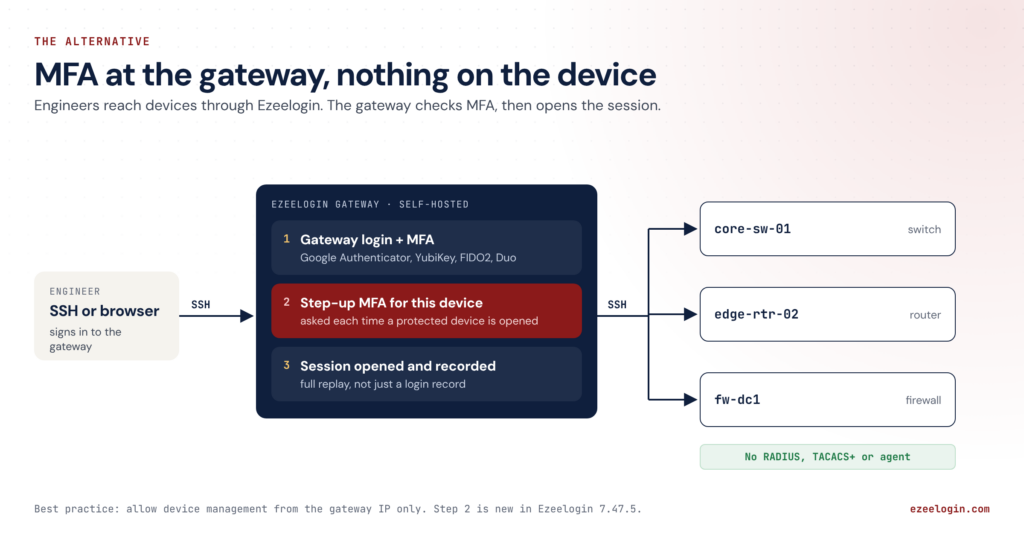
MFA at the gateway: engineers sign in to the Ezeelogin gateway with MFA, confirm a step-up code for the device, and the gateway opens a recorded SSH session to the switch, router or firewall, which needs no RADIUS or TACACS+ configuration.
With a self-hosted SSH gateway such as Ezeelogin, engineers sign in to the gateway with MFA and open devices from there. From Ezeelogin 7.48 you can also require a step-up MFA challenge for specific devices or groups: each time someone opens a core switch or firewall, they confirm a second code first. The device only ever sees a normal SSH login from the gateway, so:
- nothing is configured on the device, and gear without RADIUS or TACACS+ support is covered too
- every session is recorded and can be replayed, not just logged (see session recording)
- one MFA policy covers servers and network devices
- you close the side door by allowing management access only from the gateway’s IP
You don’t have to throw your RADIUS investment away either. Ezeelogin can use your RADIUS server as the second factor for web panel logins, so the MFA your team already uses keeps working there. SSH sessions through the gateway use Ezeelogin’s own MFA: Google Authenticator, YubiKey, FIDO2 or Duo.
Read more: how it works step by step on MFA for network devices, and every supported method (Google Authenticator, YubiKey, FIDO2, Duo and more) on SSH MFA.
Which approach fits?
| RADIUS MFA on each device | Gateway MFA (Ezeelogin) |
Config on every device | Yes, per vendor | None |
Devices without RADIUS/TACACS+ | Not covered | Covered over SSH |
What you can review afterwards | Login records (plus command lists with TACACS+) | Full session recording and replay |
Extra infrastructure | RADIUS/MFA server, plus a proxy in some setups | One self-hosted gateway |
Fits best when | Few device types, all with solid AAA support, and an existing RADIUS estate | Mixed vendors, older gear, audit requirements, servers and devices under one policy |
Plenty of teams run both: RADIUS for Wi-Fi and VPN, and a gateway for privileged access to infrastructure.
FAQ
Is RADIUS MFA the same as RADIUS 2FA?
Yes. Both mean adding a second factor to a RADIUS login. “2FA” is the common term when that second factor is a single code or push.
Does RADIUS support MFA natively?
No. The protocol only carries the login conversation. MFA comes from the RADIUS server or proxy, which asks for the second factor using Access-Challenge, a held request for push, or a code appended to the password.
What RADIUS timeout should I set for push MFA?
30–60 seconds, with retransmits at one. Device defaults are often around 5 seconds, which causes failed logins and duplicate push notifications.
Does RADIUS MFA work with MSCHAPv2?
Sometimes, but often only for push. Code entry usually needs PAP. Check your MFA server’s documentation.
Should I use RADIUS or TACACS+ for network device MFA?
Either can carry MFA. Choose TACACS+ if you need per-command authorisation; choose based on your devices and existing servers otherwise.
Can I keep my RADIUS MFA and still use Ezeelogin?
Yes. Ezeelogin can use your RADIUS server as the second factor for web panel logins. SSH sessions through the gateway use Ezeelogin’s own MFA, and you also get step-up MFA per device and session recording.