How to add a subssh user with non privileged remote ssh login user
How to create sub ssh user when a remote server is added with non privileged remote SSH Login User?
Overview: This article details on how to add a remote server ’’web.eznoc.com’ to Ezeelogin gateway with Remote SSH Login User ’Tech’ ( non privileged system user ) and allows the gateway user ’Ted’ to log in to the remote server as a SubSSH user ’Dev’ ( non privileged system user )
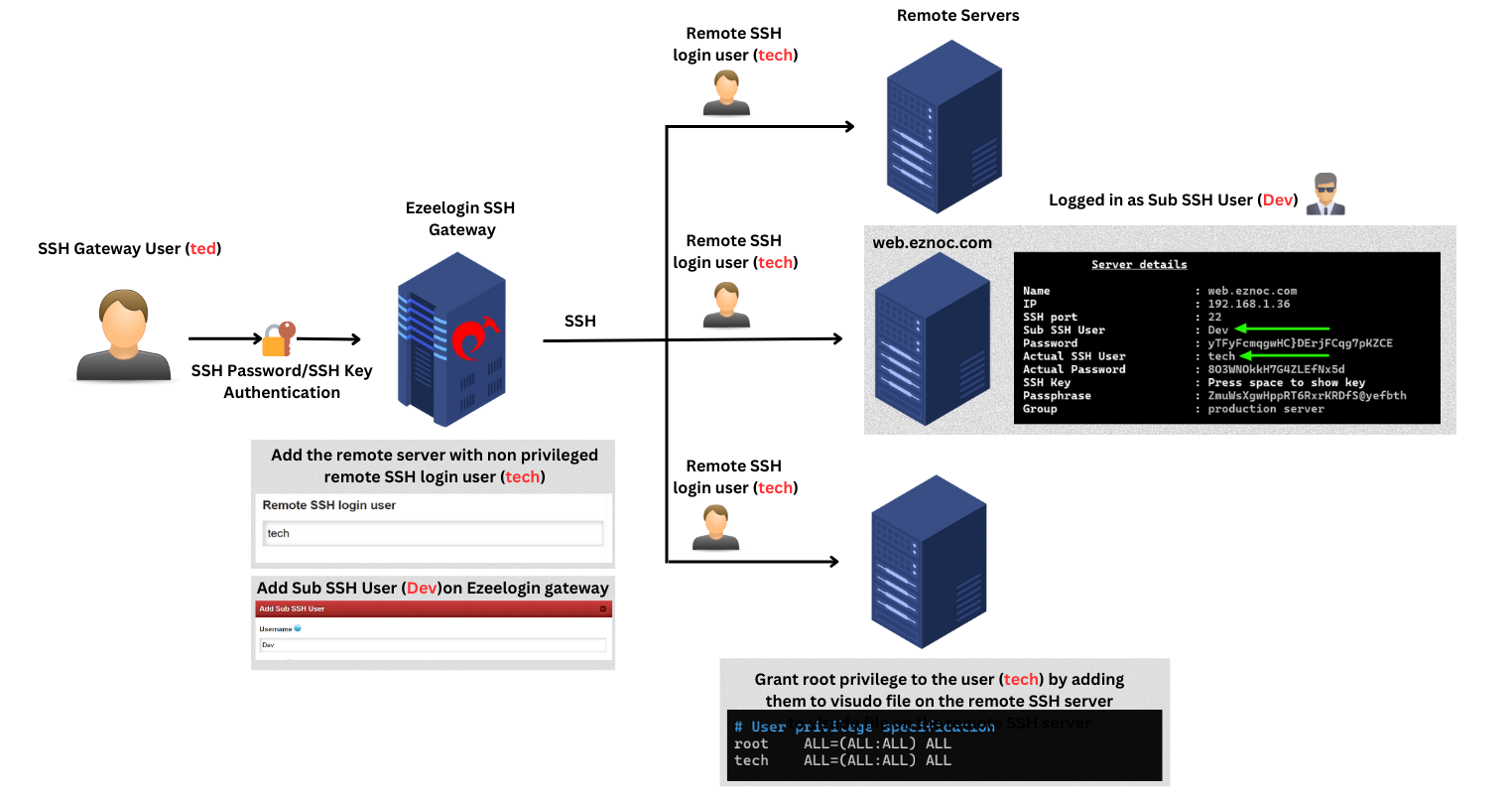
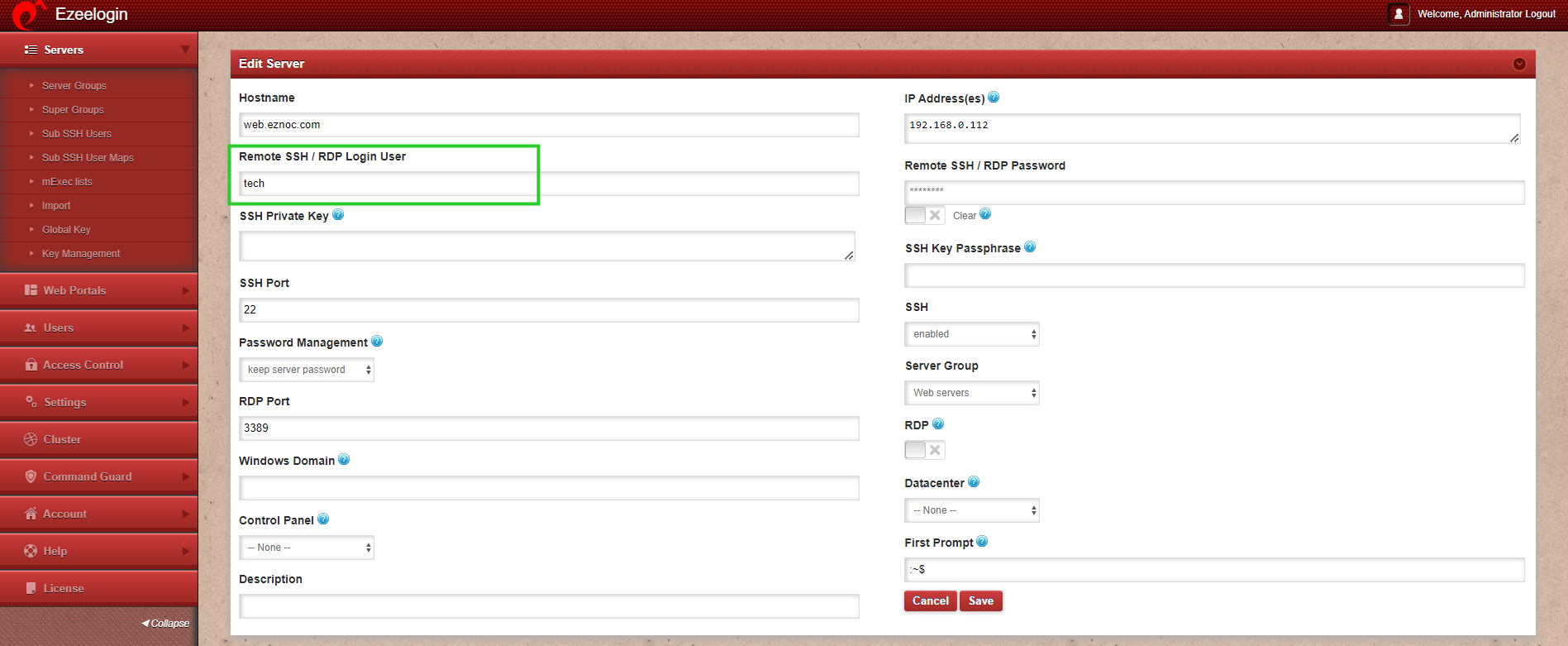
Step 1: Add the remote server (web.eznoc.com) with the non-privileged Remote SSH Login User(tech).
Step 2: Grant necessary privileges to the Remote SSH Login User(tech) in the sudoers file on the remote SSH server (web.eznoc.com).
Step 2(A): Create a config file for granting privileges for user group and assign permissions.
If you are using key-based authentication, make sure to provide ’NOPASSWD’ in the sudoers file.
root@web.eznoc.com:~# vim /etc/sudoers.d/user_management
%<new_group_name> ALL=(ALL) NOPASSWD:/usr/bin/sh -c *
eg: tech ALL=(ALL) NOPASSWD:/usr/bin/sh -c *
root@web.eznoc.com:~# chmod 440 /etc/sudoers.d/user_management
Step 2(B): Check syntax of sudoers file
root@web.eznoc.com:~# visudo -c
/etc/sudoers: parsed OK
/etc/sudoers.d/user_management: parsed OK
Step 3: Create SubSSH user (Dev) and perform mapping.
If creating SubSSH user on high number of servers, make sure to increase values in php.ini. Refer step 2 from below article.
Step 3(A): Create SubSSH user
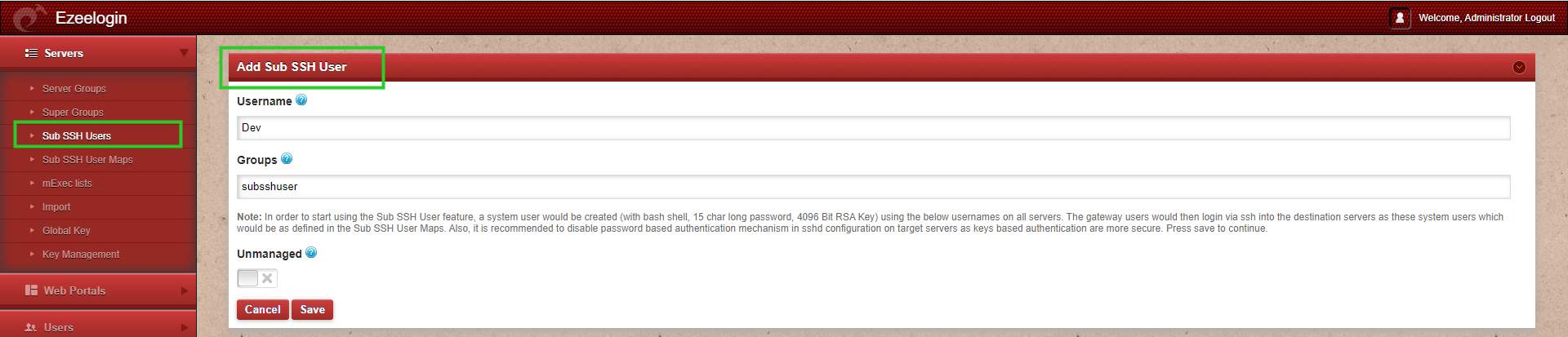
Step 3(B): To map a SubSSH user based on groups, go to Sub SSH User Maps, then select the user group, SubSSH user, and server group.

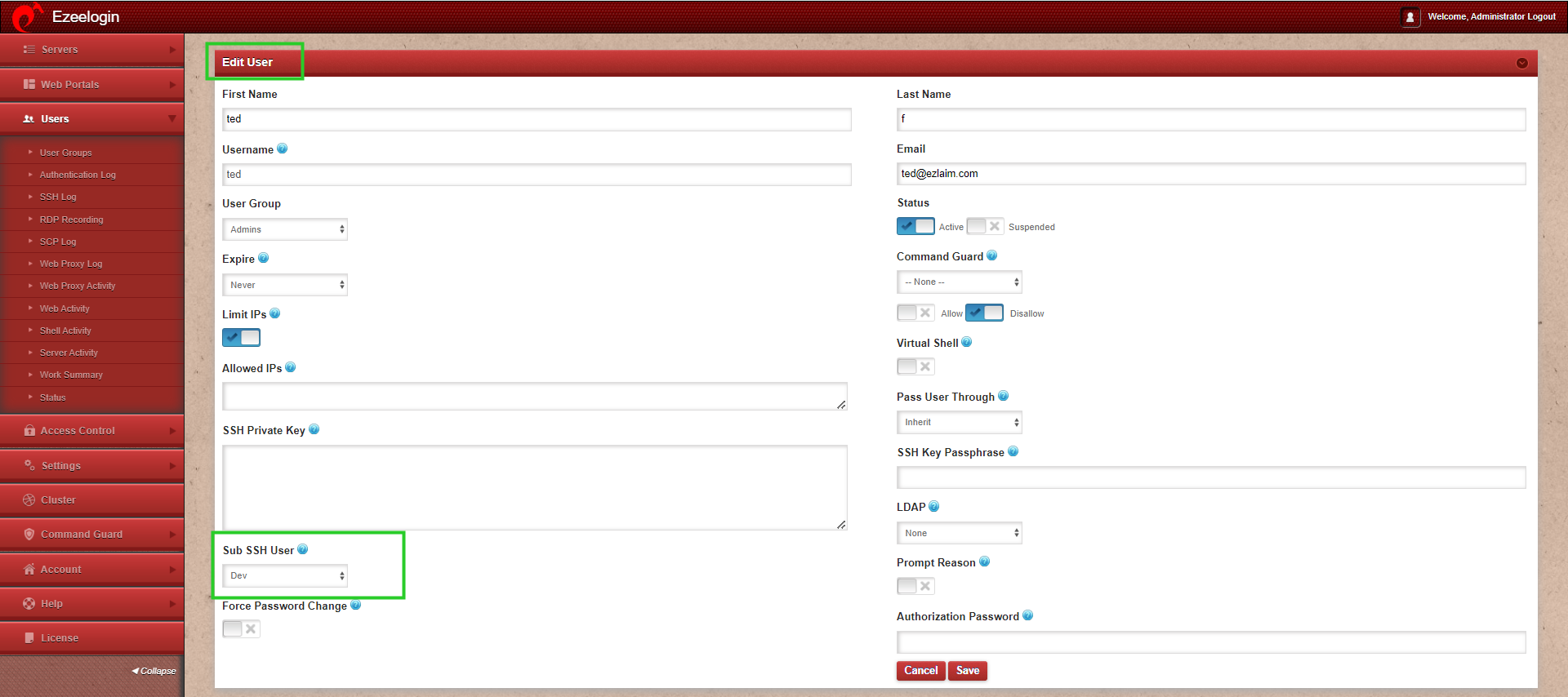
Step 3(C): To map SubSSH user for an individual gateway user, edit the gateway user and select the sub ssh user.
Step 4: Login to the remote server (web.eznoc.com) via ezsh.
When you click ’tab’ key to view the server details, you can see that you have logged in to the remote server as the Sub SSH user ’Dev’ instead of the non-privileged remote SSH login user ’tech’ .
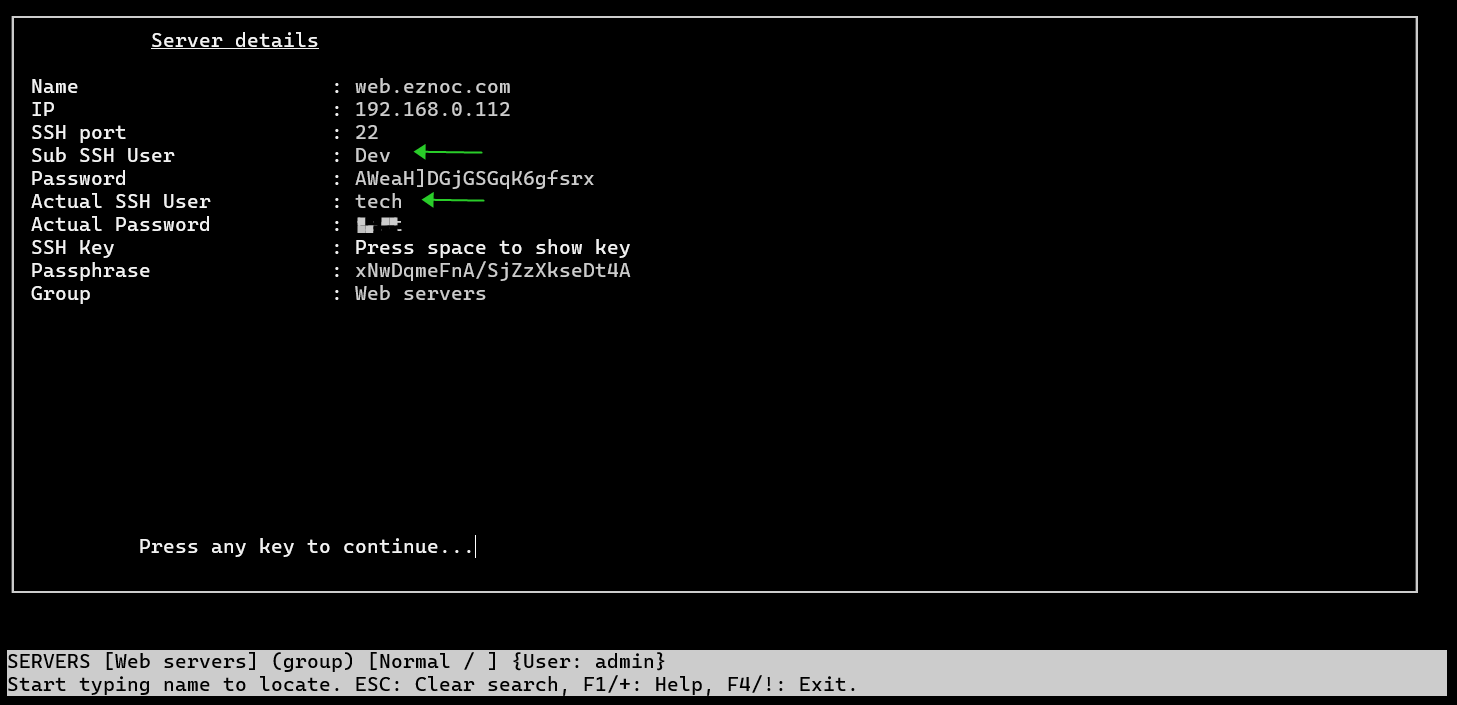

1. How to Create a SubSSH User with the Same Username as an Ezeelogin User
The Ezeelogin gateway user and the SubSSH user can have the same username. When the user mapping is configured correctly, the gateway user will connect to the remote server using the corresponding SubSSH account.
For example, suppose a gateway user named tony already exists in Ezeelogin.
- Enter tony as the SubSSH username, matching the existing Ezeelogin gateway username.
- Save the configuration.
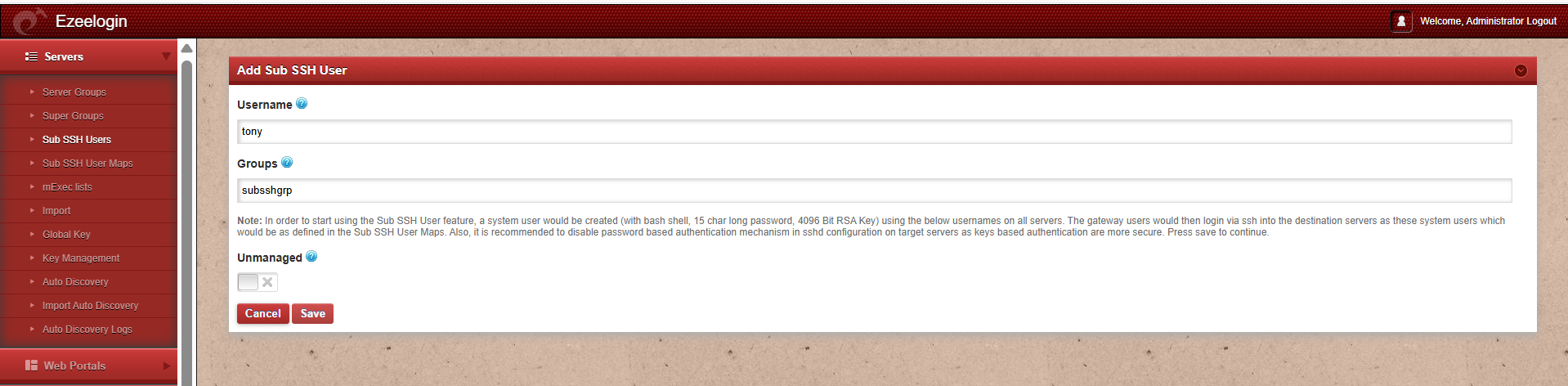

The gateway user tony can now connect to the remote server using the corresponding SubSSH account.
2. Unable to Create a SubSSH User When the Gateway Server Is Added as a Remote Server
If the gateway server itself is also added as a remote server(testserver) in Ezeelogin, creating a SubSSH user may fail with the following error:
( Skip gateway local node: a4d34be3977bbae9cbbeb379e465eaba9cc2343c )
This error appears when the server you are targeting is the same gateway server that Ezeelogin is running on. Ezeelogin treats it as the gateway’s local node and skips it, so the SubSSH user cannot be created for it.
3. How can we create a SubSSH User with the Same Username as a Remote Ezeelogin Server
If the remote server you add is a different Ezeelogin server (not the gateway itself), you can create a SubSSH user with the same username as the corresponding user on that remote Ezeelogin server. In this case the SubSSH user is created successfully, even when the username matches the Ezeelogin user.
This feature is available starting from Ezeelogin version 7.48.0. If you are using an older version refer this article to upgrade Ezeelogin to latest version.
Creation of Subssh user fails
If the Ezeelogin gateway server has more remote servers, it will take more time to create the subssh user in all the servers. Refer below article to increase the execution time of the script in the gateway server.
Related articles:
Error: An error occurred while trying to submit the form (error: Forbidden)
Add a server using SSH key pair
Setup public-key in the remote server