Assign command guard groups for users or user groups
How to assign command guard groups for user groups from the Ezeelogin Software GUI?
1. To restrict commands in the Ezeelogin jump server shell enable command guard from Ezeelogin GUI
2. Modify the user by selecting the command group from the dropdown menu. Then, use the "Allow" or "Disallow" options to grant or restrict access to commands within the chosen command group.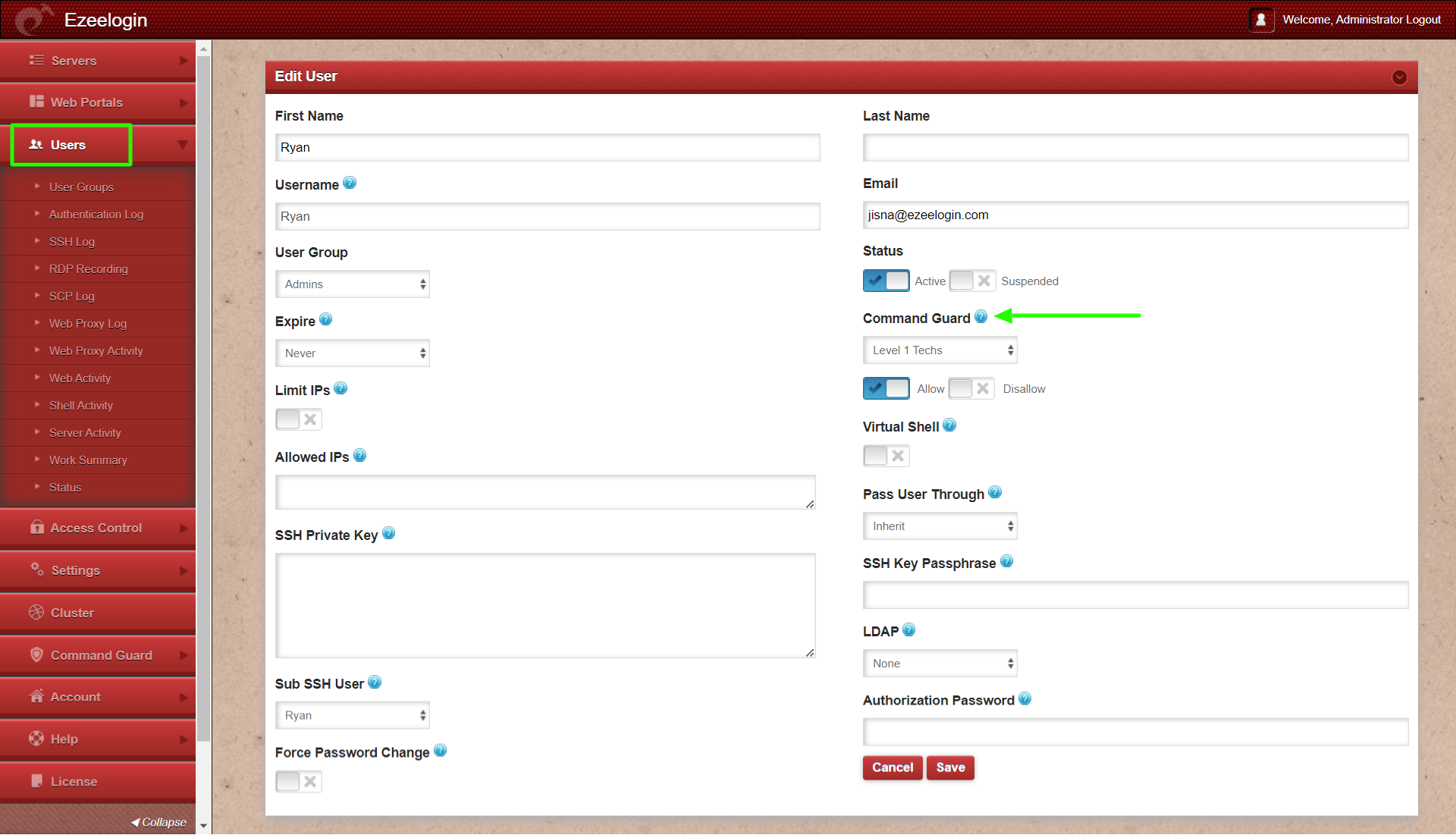
3. Edit the user group, choose the command group, and select Allow / Disallow to allow or disallow commands in the command group.
This feature is available from Ezeelogin version 7.36.0.
Refer article to upgrade Ezeelogin to the latest version.
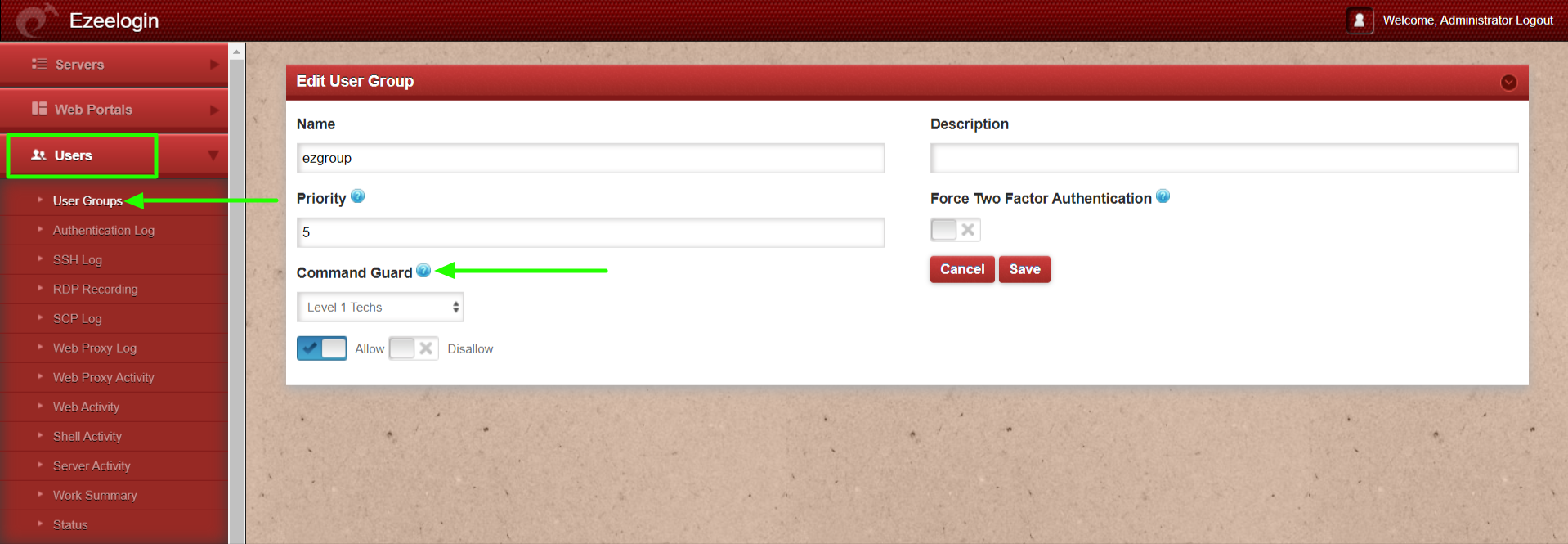
Allow will let the users in the usergroup execute only those commands matching the regular expression of commands in the command group
Disallow will prevent the users in the usergroup from executing any of the commands matching the regular expression of commands in the command group and will let the user execute all other commands.
How to assign command guard groups for users or user groups from the command line interface (CLI)?
How to view the database and prefix name using by Ezeelogin?
1. Run the below command to find the database and prefix name.
root@gateway ~]# cat /usr/local/etc/ezlogin/ez.conf | grep -i 'db_name\|db_prefix'
Refer below example output of the above command.
db_name ezlogin_gueqvf
db_prefix iprspn_
2. Run the below single command to view the command guard ID and user group ID. Replace db_name and db_prefix from the above output.
root@gateway ~]# mysql -u root -e "use db_name ; select * from db_prefix_commandgroups;" -p
root@gateway ~]# mysql -u root -e "use db_name ; select * from db_prefix_usergroups;" -p
Refer below example output of the above commands to view the command guard group ID and user group ID.
- root@gateway ~]# mysql -u root -e "use ezlogin_gueqvf ; select id,name from iprspn_commandgroups ; " -p
Enter password:
+----+---------+
| id | name |
+----+---------+
| 1 | default |
+----+---------+
- root@gateway ~]# mysql -u root -e "use ezlogin_gueqvf ; select id,name from iprspn_usergroups ; " -p
Enter password:
+----+--------+
| id | name |
+----+--------+
| 1 | Admins |
| 2 | Dummy |
+----+--------+
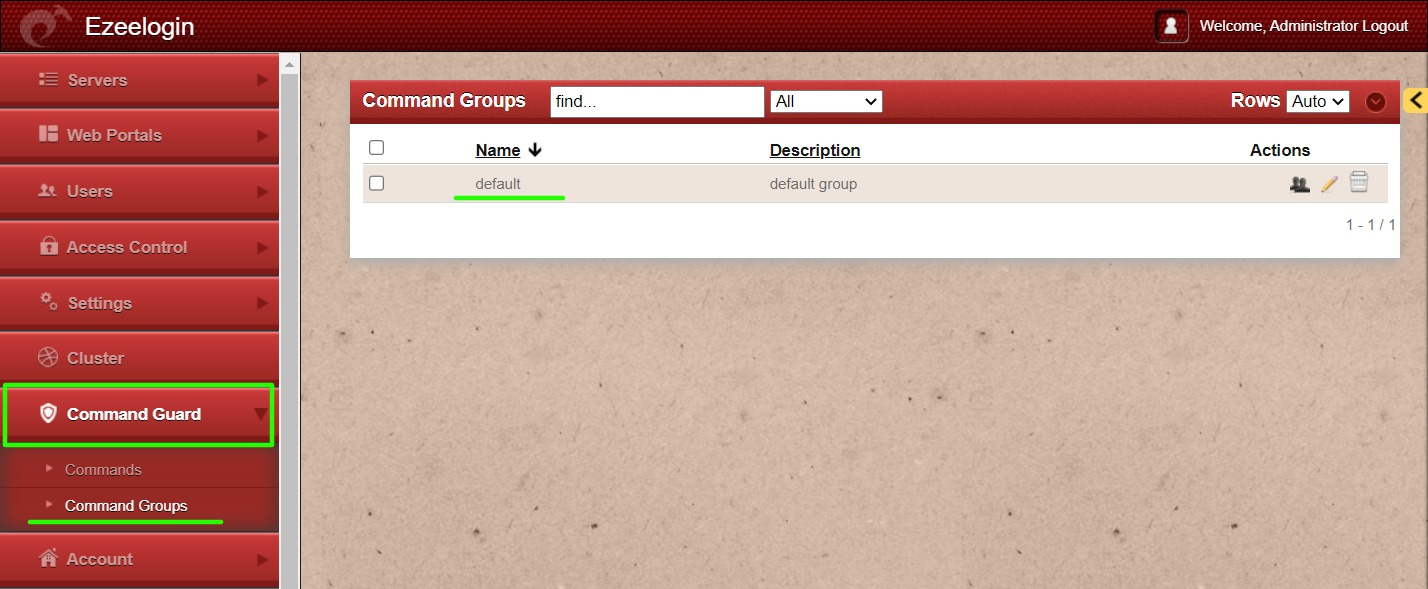
Refer screenshots below of the command guard group from Ezeelogin GUI.
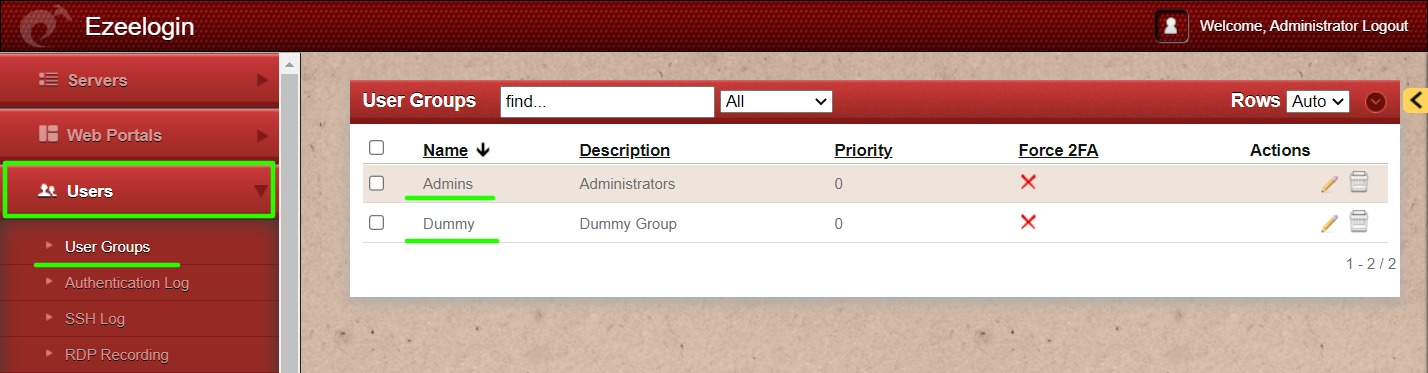
Refer screenshots below of the user group from Ezeelogin GUI.
How to assign a command guard group for a user group from CLI?
- Run the below command to assign the command guard group to the user group with Disallow (allow all command that does not match the command group). The below command will assign the command guard group default to user group Dummy. Replace command guard group ID and user group ID.
root@gateway ~]# php /usr/local/ezlogin/ez_queryrunner.php "update prefix_users SET commandgroup_id=1,command_guard_type='Disallow' WHERE usergroup_id=2"
- Run the below command to assign the command guard group to the user group with Allow (allow only input matching the command group). The below command will assign the command guard group default to user group Dummy. Replace command guard group ID and user group ID.
root@gateway ~]# php /usr/local/ezlogin/ez_queryrunner.php "update prefix_users SET commandgroup_id=1,command_guard_type='Allow' WHERE usergroup_id=2"
How to disable the command guard group for a user group from CLI?
- Run the below command to disable the command guard group for a user group. Replace user group ID
root@gateway ~]# php /usr/local/ezlogin/ez_queryrunner.php "update prefix_users SET commandgroup_id=0 WHERE usergroup_id=2"
How to assign a command guard group for multiple user groups from CLI?
- Run the below command to assign the command guard group to the multiple user groups with Disallow. Replace command guard group ID and user group ID. Add multiple user groups separated with OR to assign it to all user groups.
root@gateway ~]# php /usr/local/ezlogin/ez_queryrunner.php "update prefix_users SET commandgroup_id=1,command_guard_type='Disallow' WHERE usergroup_id=1 OR usergroup_id=2"
- Run the below command to assign the command guard group to the multiple user groups with Allow. Replace command guard group ID and user group ID. Add multiple user groups separated with OR to assign it to all user groups.
root@gateway ~]# php /usr/local/ezlogin/ez_queryrunner.php "update prefix_users SET commandgroup_id=1,command_guard_type='Allow' WHERE usergroup_id=1 OR usergroup_id=2"
How to disable the command guard group for multiple user groups from CLI?
- Run the below command to disable the command guard group for the multiple user groups. Replace user group ID.
root@gateway ~]# php /usr/local/ezlogin/ez_queryrunner.php "update prefix_users SET commandgroup_id=0 WHERE usergroup_id=1 OR usergroup_id=2"
How to view the command guard group ID and user ID from CLI?
Run the below single command to view the command guard group ID and user ID. Replace db_name and db_name.
root@gateway ~]# mysql -u root -e "use db_name ; select id,username from db_prefix_commandgroups;" -p
root@gateway ~]# mysql -u root -e "use db_name ; select id,username from db_prefix_users;" -p
Refer below example output of the above command.
- root@gateway ~]# mysql -u root -e "use ezlogin_gueqvf ; select id,username from iprspn_commandgroups;" -p
Enter password:
+----+---------+
| id | name |
+----+---------+
| 1 | default |
+----+---------+
- root@gateway ~]# mysql -u root -e "use ezlogin_gueqvf ; select id,username from iprspn_users;" -p
Enter password:
+----+----------+
| id | username |
+----+----------+
| 1 | ezadmin |
| 2 | alex |
| 3 | tony |
| 4 | john |
+----+----------+
How to assign a command guard group for multiple users from CLI?
- Run the below command to assign the command guard group to multiple users with Allow. Replace command guard group ID and usernames. Add multiple usernames separated with OR to assign them to all user groups.
root@gateway ~]# php /usr/local/ezlogin/ez_queryrunner.php "update prefix_users SET commandgroup_id=1,command_guard_type='Allow' WHERE username='tony' OR username='john'"
- Run the below command to assign the command guard group to multiple users with Disallow. Replace command guard group ID and usernames. Add multiple usernames separated with OR to assign them to all user groups.
root@gateway ~]# php /usr/local/ezlogin/ez_queryrunner.php "update prefix_users SET commandgroup_id=1,command_guard_type='Disallow' WHERE username='tony' OR username='john'"
How to disable the command guard group for multiple users from CLI?
- Run the below command to disable the command guard group for multiple users. Replace usernames.
root@gateway ~]# php /usr/local/ezlogin/ez_queryrunner.php "update prefix_users SET commandgroup_id=0 WHERE username='tony' OR username='john'"
How to assign a command guard group for a single user from CLI?
- Run the below command to assign the command guard group to a single user with Allow. Replace command guard group ID and username.
root@gateway ~]# php /usr/local/ezlogin/ez_queryrunner.php "update prefix_users SET commandgroup_id=1,command_guard_type='Allow' WHERE username='alex'"
- Run the below command to assign the command guard group to a single user with Disallow. Replace command guard group ID and username.
root@gateway ~]# php /usr/local/ezlogin/ez_queryrunner.php "update prefix_users SET commandgroup_id=1,command_guard_type='Disallow' WHERE username='alex'"
How to disable the command guard group for a single user from CLI?
- Run the below command to disable the command guard group to a single user with Allow. Replace command guard group ID and username.
root@gateway ~]# php /usr/local/ezlogin/ez_queryrunner.php "update prefix_users SET commandgroup_id=0,command_guard_type='Allow' WHERE username='alex'"
- Run the below command to disable the command guard group to a single user with Disallow. Replace command guard group ID and username.
root@gateway ~]# php /usr/local/ezlogin/ez_queryrunner.php "update prefix_users SET commandgroup_id=0,command_guard_type='Disallow' WHERE username='alex'"
Related Article