LICENSE ERROR :0812
How to fix 'LICENSE ERROR:0812' and 'Server time out of sync' issues in Ezeelogin?
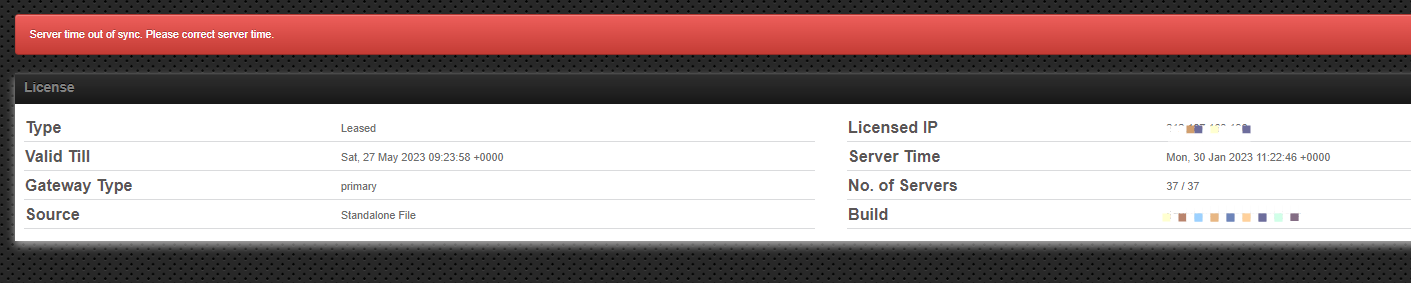
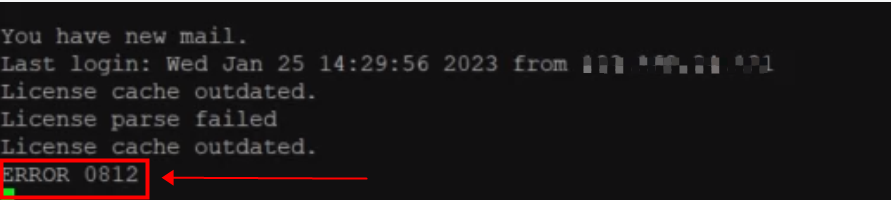
Overview: This article helps users to resolve the "Server time out of sync. Please correct Server time." error in the web GUI and the "LICENSE ERROR:0812" error in the backend(ezsh) by replacing the existing standalone license with a new one.
Ezeelogin UI error message:
Ezeelogin backend error message:
Step 1: Check server time:
root@gateway:~# date
Step 2: Correct PHP time:

root@gateway:~# vi /etc/php.ini #RHEL-based OS
root@gateway:~# vi /etc/php/<php-version>/apache2/php.ini #Debian-based OS
Uncomment the date. timezone function and set its value to the timezone you need.
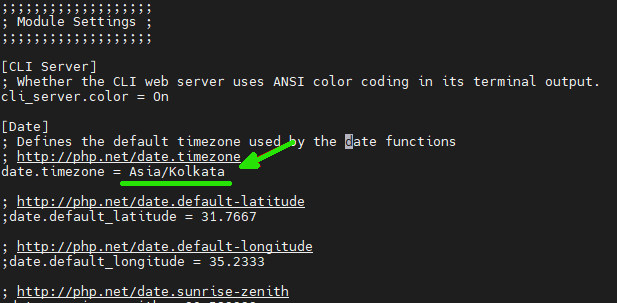
To see a list of supported timezones, refer to php.net.
Step 2.c: After editing the file, restart the httpd service.
root@gateway:~#systemctl restart httpd #RHEL-based OS
root@gateway:~#systemctl restart apache2 #Debian-based OS
Step 3: Replace existing standalone license file with a new one.
Contact the Ezeelogin support team via 24×6 Live Chat Support or Helpdesk to request a new standalone license.
Related Articles:
How to renew/update standalone license ?
LICENSE ERROR: Could not resolve host: license.ezeelogin.com