Unable to initialize Duo Security Two Factor Authentication. Please make sure the system time is correct on the gateway server.
Error: Unable to initialize Duo Security Two Factor Authentication.
Please make sure the system time is correct on the gateway server.
Error while ssh logging:

Error log from ezsh.log of admin user
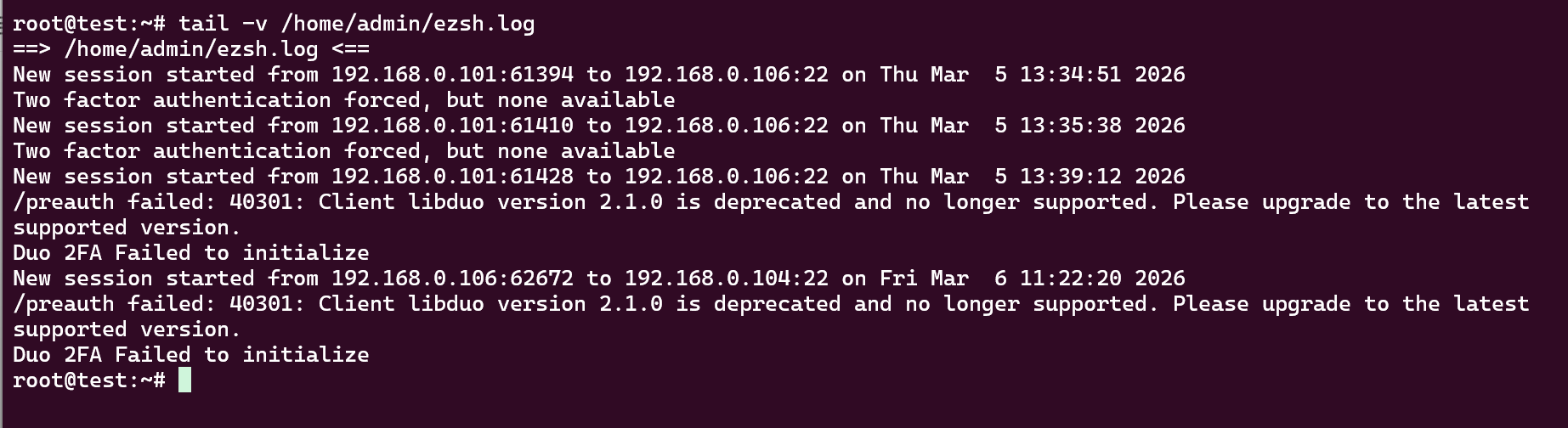
This error occurs at the backend due to DUO Web SDK. Ezeelogin have already patched a fix for this, and the new version of Ezeelogin (7.45.0) supports Web SDK v4. The latest Ezeelogin version (7.45.0) has been released and includes the updated Duo libraries that resolve the Duo Web SDK deprecation warnings. Hence you can upgrade to the latest version(7.45.0).
For more details, please refer to:
Duo advisory: https://help.duo.com/s/article/945
Ezeelogin KB news: https://www.ezeelogin.com/kb
Change Log : https://www.ezeelogin.com/kb/news/ezeelogin-jump-server-software-version-7450-released-55.html
Note: If you are running a PHP version lower than 8.1, you will need to upgrade PHP to version 8.1 or above to support the latest Ezeelogin version. https://www.ezeelogin.com/kb/article/upgrade-php-from-7-x-to-8-x-in-rhel8-612.html
Make sure to take the complete backup of Ezeelogin before php upgrade: https://www.ezeelogin.com/kb/article/how-to-create-a-complete-backup-of-ezeelogin-installation-70.html
Please follow the steps below to upgrade Ezeelogin to the latest version:
1. Run the below command to fully backup the current installation.
root@gateway ~]# /usr/local/sbin/backup_ezlogin.php
2. Download the latest Ezeelogin package corresponding to the PHP version running on your gateway server.
root@gateway ~]# wget https://downloads.ezeelogin.com/ezlogin_7.45.0_php84.bin # for PHP 8.4
root@gateway ~]# wget https://downloads.ezeelogin.com/ezlogin_7.45.0_php82.bin # for PHP 8.3 or 8.2
root@gateway ~]# wget https://downloads.ezeelogin.com/ezlogin_7.45.0_php81.bin # for PHP 8.1
You can also download the latest Ezeelogin package from the billing portal: Ezeelogin Billing Portal
3. Make sure to re-set up the ionCube Loader. Also, ensure that you restart the web server and PHP-FPM (if available).
3.1. Create New directory and move existing ioncube files.
root@gateway:~# mv /usr/local/ioncube /usr/local/ioncube_backup
3.2. Re-download Ioncube package and extract it to correct directory.
root@gateway:~# wget https://downloads.ioncube.com/loader_downloads/ioncube_loaders_lin_x86-64.tar.gz
root@gateway:~# tar -zxf ioncube_loaders_lin_x86-64.tar.gz && mv ioncube /usr/local
3.3. Restart web server and FPM (if available).
root@gateway:~# systemctl restart apache2
root@gateway:~# systemctl restart php-fpm
root@gateway:~# systemctl restart httpd // For Rhel based system
4. Confirm the PHP versions to see whether ioncube has loaded properly.
root@gateway:~# php -v
PHP 8.4.18 (cli) (built: Feb 13 2026 15:59:43) (NTS)
Copyright (c) The PHP Group
Built by Debian
Zend Engine v4.4.18, Copyright (c) Zend Technologies
with the ioncube PHP Loader v15.0.0, Copyright (c) 2002-2025, by ioncube Ltd.
with Zend OPcache v8.4.18, Copyright (c), by Zend Technologies
4.1. Ensure that ioncube decoders are loaded by viewing the PHP configuration page.


5. Run the below command to upgrade Ezeelogin using a single command. Replace the Ezeelogin package name, database root username, and password.
root@gateway :~# sh ezlogin_7.45.0_php84.bin -- -dbsuser <(root)db_username> -dbspass <(root)db_password> -skipgeolite -auto -force -ACCEPT_SETTINGS -I_ACCEPT_EULA -skipbackup -update
Related Articles:
Upgrade Ezeelogin Jump server to the latest version
Install Ioncube on Jumpserver.